WhatsApp Privacy Feature: These days, WhatsApp has become a major part of everyday communication. From family conversations to office meetings and important personal calls, many people now depend on WhatsApp calling more than traditional phone calls.
But along with convenience, there has also been a noticeable rise in spam calls, scam attempts, and annoying unknown numbers interrupting daily life.
If you are tired of random WhatsApp calls disturbing your work, sleep, studies, or personal time, there is a simple privacy feature that can help. WhatsApp’s “Silence Unknown Callers” setting is designed to reduce unnecessary interruptions while still allowing you to keep track of suspicious calls safely.

WhatsApp Privacy Feature
| Feature | Android | iPhone | Benefit | Result |
|---|---|---|---|---|
| Access Path | Settings > Privacy > Calls | Settings > Privacy > Calls | Easy setup | Quick activation |
| Unknown Calls | Silenced | Silenced | Fewer interruptions | Peaceful experience |
| Call Log | Visible | Visible | Track missed calls | Better control |
| Notifications | Available | Available | Safety awareness | No missed alerts |
| Main Purpose | Spam protection | Spam protection | Privacy boost | Safer calling |
What Is WhatsApp’s Silence Unknown Callers Feature?
WhatsApp introduced the Silence Unknown Callers feature as a privacy-focused tool to protect users from unexpected calls coming from unfamiliar numbers. It helps reduce disturbance without completely blocking every unknown contact.
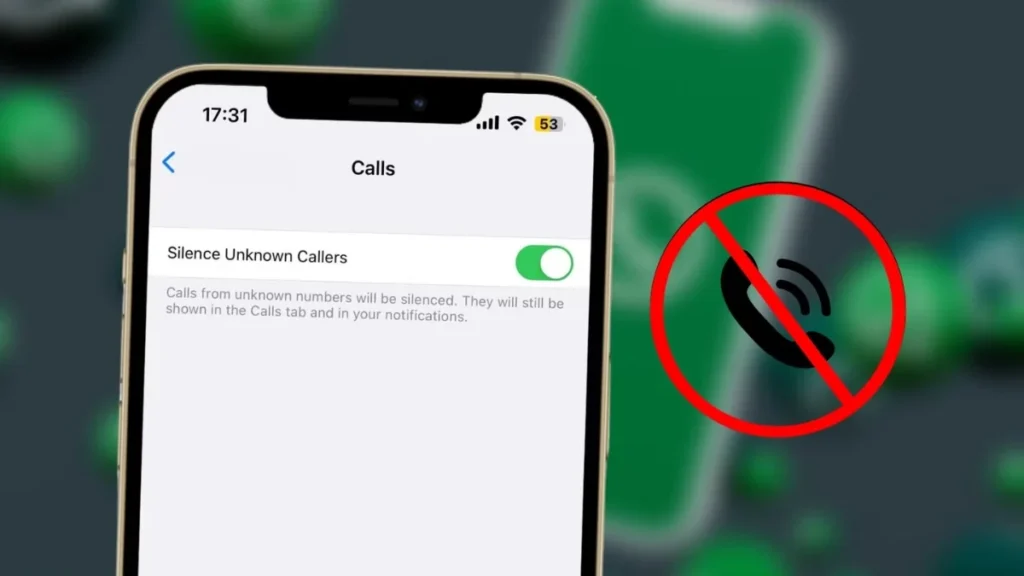
Once this feature is enabled, calls from numbers that are not saved in your contact list or have never interacted with you before will be silenced automatically. The call will still appear inside your WhatsApp call history, allowing you to review it later if needed.

How This Feature Actually Works
Unlike a full call blocking system, this feature works in a softer and smarter way. It does not reject unknown callers entirely but prevents your phone from ringing loudly when suspicious or unfamiliar calls arrive.
This creates a safer balance between privacy and awareness. You remain protected from sudden interruptions while still having visibility of missed calls in case something turns out to be important.
Why This Feature Matters More Than Ever
Spam and scam calls have become increasingly common across messaging platforms. Many fraudsters now use WhatsApp to make fake banking calls, promotional scams, phishing attempts, and suspicious international contact requests.

For users who receive repeated unknown calls, this feature brings peace of mind. It helps reduce stress and makes it easier to focus during work hours, study sessions, meetings, or nighttime rest.
How to Enable Silence Unknown Callers on Android
Android users can activate this privacy feature in just a few simple steps. Open WhatsApp on your smartphone and tap the three-dot menu located in the top-right corner of the screen.
From there, go into Settings, then open Privacy and select the Calls section. Inside this menu, you will find the Silence Unknown Callers option, which can be turned on with a simple toggle.
How to Enable Silence Unknown Callers on iPhone
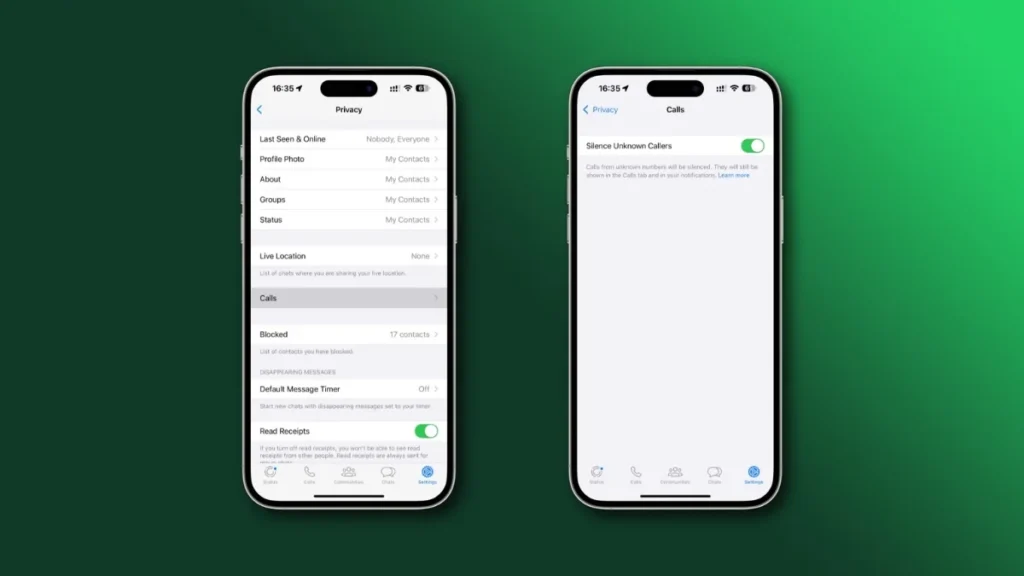
iPhone users can access the same feature through the WhatsApp settings menu. Open WhatsApp and tap the Settings option available in the bottom navigation area.

Next, enter the Privacy section and select Calls. Here you will see the Silence Unknown Callers setting, which can be activated instantly to reduce unwanted interruptions.
What Happens After You Turn It On?
Once enabled, your phone will no longer ring loudly for unknown WhatsApp calls. This means sudden spam calls will not disturb you during important moments, helping create a calmer user experience.
However, these calls are not erased or hidden completely. They remain visible in call history and notification logs, allowing users to manually check them later if necessary.

A Helpful Tool for Personal Safety
Scam calls often rely on surprise and urgency to pressure people into quick decisions. By removing the sudden ringing factor, users gain more control over how they respond to unexpected contact attempts.
This extra layer of privacy can be especially useful for elderly users, students, professionals, and anyone who prefers a quieter and more controlled digital experience.
Should You Enable This Feature?
If you frequently receive unknown WhatsApp calls, enabling this feature makes a lot of practical sense. It reduces distractions while keeping you informed enough to review missed calls safely.

For people who value privacy, focus, and protection from scam attempts, this simple WhatsApp setting can make daily smartphone use much more comfortable.
Disclaimer: This article is for informational purposes only and is based on currently available WhatsApp features. Feature availability, settings layout, and app behavior may vary depending on device type, operating system version, and future WhatsApp updates.
Also read:
Samsung AI Smart TV Amazon Summer Sale: Discount Brings Premium 4K Entertainment Experience
Apple Watch SE 3: Croma Sale Discount Brings Premium Smartwatch Experience Affordable